

Asterisk via MRCP Media Relay Control Protocol
UniMRCP for Asterisk Installation
We well use Asterisk 18 in our example. Asterisk 19 is not supported anymore and Asterisk 20 was not tested with UniMRCP.So the instructions to install are below:
Note: UniMRCP server should already be installed and working.
cd ~
apt -y install build-essential git curl wget libnewt-dev libssl-dev libncurses5-dev subversion libsqlite3-dev libjansson-dev libxml2-dev uuid-dev default-libmysqlclient-dev sox ffmpeg
groupadd asterisk
useradd -r -d /var/lib/asterisk -g asterisk asterisk
wget http://downloads.asterisk.org/pub/telephony/asterisk/asterisk-18-current.tar.gz
tar -zxvf asterisk-18-current.tar.gz
cd asterisk-18.23.1
./contrib/scripts/get_mp3_source.sh
./contrib/scripts/install_prereq install
./configure --with-jansson-bundled --with-pjproject-bundled
make
make install
make samples
make config
make install-headers
ldconfig
chown -R asterisk.asterisk /etc/asterisk
chown -R asterisk.asterisk /var/{lib,log,spool}/asterisk
chown -R asterisk.asterisk /usr/lib/asterisk
systemctl enable asterisk
systemctl start asterisk
Asterisk UniMRCP installation
cd ~
curl -O -J -L https://www.unimrcp.org/project/component-view/asterisk-unimrcp-1-10-0-tar-gz/download
tar -xzvf asterisk-unimrcp-1.10.0.tar.gz
cd asterisk-unimrcp-1.10.0
./bootstrap
./configure
make
make install
Asterisk UniMRCP Configuration
There are two ways to use Asterisk with UniMRCP. The old way using the module res_speech_unimrcp or the new way using app_unimrcp. The latest is a bit more flexible. The configuration diagram is below.
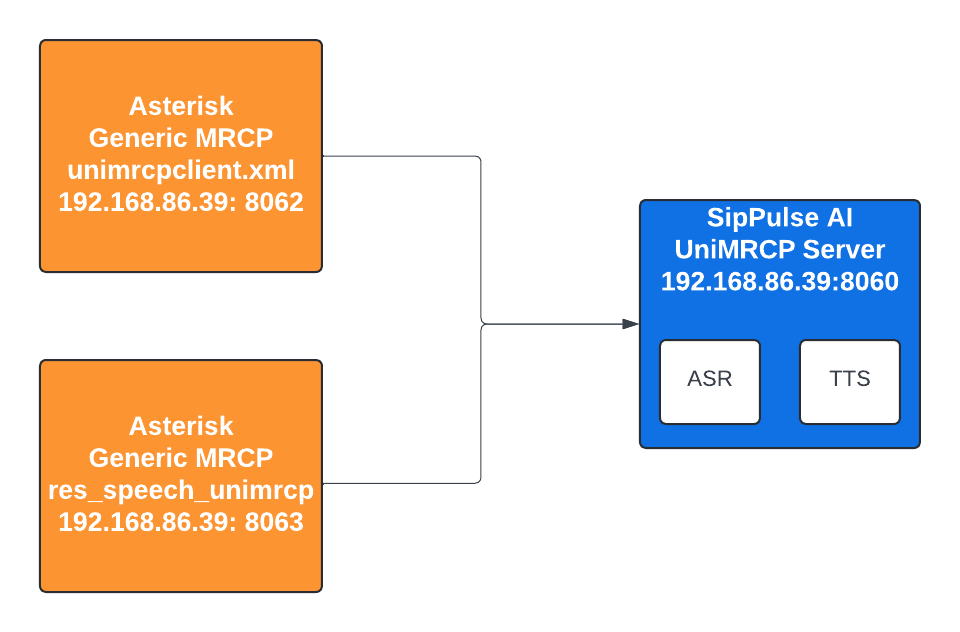
Please change the environment and IP address according to your own installation.
Generic Speech Recognition API
This method uses res_speech_unimrcp module. In this cases you have to configure the unimrcpclient.xml and the file res_speech_unimrcp.conf..
update the IP address in the file to use your own
/usr/local/unimrcp/conf/unimrcpclient.xml
<?xml version="1.0" encoding="UTF-8"?>
<!-- UniMRCP client document -->
<unimrcpclient xmlns:xsi="http://www.w3.org/2001/XMLSchema-instance"
               xsi:noNamespaceSchemaLocation="unimrcpclient.xsd"
               version="1.0"
               subfolder="client-profiles">
  <properties>
    <ip>192.168.86.39</ip>
    <server-ip>192.168.86.39</server-ip>
  </properties>
  <components>
    <!-- Factory of MRCP resources -->
    <resource-factory>
      <resource id="speechsynth" enable="true"/>
      <resource id="speechrecog" enable="true"/>
      <resource id="recorder" enable="true"/>
      <resource id="speakverify" enable="true"/>
    </resource-factory>

    <sip-uac id="SIP-Agent-1" type="SofiaSIP">
      <sip-ip>192.168.86.39</sip-ip>
      <sip-port>8062</sip-port>
      <sip-transport>udp</sip-transport>
      <ua-name>UniMRCP SofiaSIP</ua-name>
      <sdp-origin>UniMRCPClient</sdp-origin>
    </sip-uac>

    <!-- UniRTSP MRCPv1 signaling agent -->
    <rtsp-uac id="RTSP-Agent-1" type="UniRTSP">
      <max-connection-count>100</max-connection-count>
      <sdp-origin>UniMRCPClient</sdp-origin>
    </rtsp-uac>

    <!-- MRCPv2 connection agent -->
    <mrcpv2-uac id="MRCPv2-Agent-1">
      <max-connection-count>100</max-connection-count>
      <max-shared-use-count>100</max-shared-use-count>
      <offer-new-connection>false</offer-new-connection>
      <rx-buffer-size>1024</rx-buffer-size>
      <tx-buffer-size>1024</tx-buffer-size>
    </mrcpv2-uac>

    <!-- Media processing engine -->
    <media-engine id="Media-Engine-1">
      <realtime-rate>1</realtime-rate>
    </media-engine>

    <!-- Factory of RTP terminations -->
    <rtp-factory id="RTP-Factory-1">
      <rtp-port-min>4000</rtp-port-min>
      <rtp-port-max>5000</rtp-port-max>
    </rtp-factory>
  </components>

  <settings>
    <!-- Common (default) RTP/RTCP settings -->
    <rtp-settings id="RTP-Settings-1">
      <jitter-buffer>
        <adaptive>1</adaptive>
        <playout-delay>50</playout-delay>
        <max-playout-delay>600</max-playout-delay>
        <time-skew-detection>1</time-skew-detection>
      </jitter-buffer>
      <ptime>20</ptime>
      <codecs>PCMU PCMA L16/96/8000 PCMU/97/16000 PCMA/98/16000 L16/99/16000</codecs>

      <!-- Enable/disable RTCP support -->
      <rtcp enable="false">
        <rtcp-bye>1</rtcp-bye>
        <tx-interval>5000</tx-interval>
        <rx-resolution>1000</rx-resolution>
      </rtcp>
    </rtp-settings>
  </settings>
</unimrcpclient>
/etc/asterisk/res-speech-unimrcp.conf
[general]
unimrcp-profile = uni2      ; UniMRCP MRCPv2 Server
log-level = DEBUG

[grammars]
[mrcpv2-properties]
Recognition-Timeout = 20000
No-Input-Timeout = 15000

[mrcpv1-properties]
Recognition-Timeout = 20000
No-Input-Timeout = 15000
MRCP Applications
You must choose one or the other way to work — either with the generic system or with the UniMRCP applications. You can use both at the same time, but you will need to configure both. The MRCP application is simpler to configure; you just need to configure the mrcp.conf file.
Please update the IP Address
[general]
; Default ASR and TTS profiles.
default-asr-profile = uni2
default-tts-profile = uni2
log-level = DEBUG
max-connection-count = 100
max-shared-count = 100
offer-new-connection = 1

[uni2]
; MRCP settings
version = 2
;
; SIP settings
server-ip = 192.168.86.39
server-port = 8060
; SIP user agent
client-ip = 192.168.86.39
client-port = 8063
sip-transport = udp
;
; RTP factory
rtp-ip = 192.168.86.39
rtp-port-min = 28000
rtp-port-max = 29000
;
; Jitter buffer settings
playout-delay = 50
max-playout-delay = 200
; RTP settings
ptime = 20
codecs=G722 PCMU telephone-event/101/8000
; RTCP settings
rtcp = 0
Testing the Speech Recognition
Once you have installed and configure Asterisk res-speech-unimrcp.conf, please restart your asterisk server. You can find a lot more examples at:
This plugin has vendor specific parameters for use with MRCPSynth and SynthandRecog.
prompt (Prompt for the usage of generative ASR models)
sttmodel
You can use
- pulse-precision(more accurate)\
- whisper-chat(fastest)\
- whisper-1(OpenAI)
ttsmodel
- azure-tts
Note: Currently we only support azure-tts because it is capable to return pcm 8khz. The usage of other models would require us to translate in real time the format causing performance issues.
Example:
When using more than one VSP, use %3B so separate the attribute value pairs as in the example. All the examples below were successfully tested.
Whisper is more precisa when you pass a prompt, usually the question made to the user is a good prompt.
Do not ommit parameters such as Voice, because it is mandatory, default stt model is whisper-1, default ttsmodel is azure-tts. Default prompt is ""
[default]
exten => 700,1,goto(res-speech-unimrcp-1,s,1)
exten => 701,1,goto(synth-unimrcp-1,s,1)
exten => 702,1,goto(synthandrecog-unimrcp-1,s,1)

[res-speech-unimrcp-1]
exten => s,1,Answer()
exten => s,2,SpeechCreate()
exten => s,3,NoOP()
exten => s,4,SpeechActivateGrammar(builtin:speech/transcribe?language=en)
exten => s,5,SpeechBackground(beep, 20)

exten => s,6,Verbose(1, "Recognition result count: ${SPEECH(results)}")
exten => s,7,GotoIf($["${SPEECH(results)}" = "0"]?8:10)
exten => s,8,Verbose(1, "Failed to recognize")
exten => s,9,Goto(30)
exten => s,10,Verbose(1, "Recognition result: ${SPEECH_TEXT(0)}, confidence score: ${SPEECH_SCORE(0)}, grammar-uri: ${SPEECH_GRAMMAR(0)}")
exten => s,11,SpeechDestroy()
exten => s,12,Hangup()

[synth-unimrcp-1]
exten => s,1,Answer
exten => s,n,MRCPSynth("I am unimrcp, the most mature way to synthesize quick voice!",v=en-US-JennyNeural)

[synthandrecog-unimrcp-1]
exten => s,1,Answer
exten => s,n,SynthAndRecog(Please say a number,builtin:speech/transcribe,b=0&ct=0.7&t=5000&sct=1000&nit=1000&vn=en-US-JennyNeural&spl=en&vsp=prompt=This was said to the customer, Please say a number%3Bsttmodel=pulse-precision)
exten => s,n,Verbose(1, ${RECOG_STATUS}, ${RECOG_COMPLETION_CAUSE}, ${RECOG_RESULT})
exten => s,n,Hangup